Thursday, November 29, 2007

N95 Classic Hits v20 Firmware

Well, sorry guys, apparently it's v20.0.0.15 and not v21, but maybe this is just a temporary update before the next firmware?? Hmm...

image

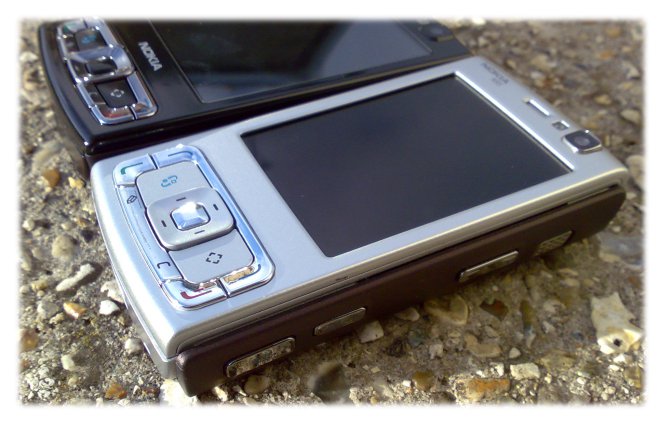
Undoubtedly this new version has fixed many, many of the n95-1's problems. Nokia has took time to listen to our cries and complaints and we have to admit, they've nailed it with this firmware. Faster camera startup, Demand Paging with more RAM, n-gage 2.0 gaming, and pretty much everything we asked for.

Here's the complete changelog of this firmware.
New Features:

  • Maps application version updated (Nokia Maps 1.0)
  • GetNGI (Games)
  • Music shop
  • OTA WMDRM (Windows Media Digital Rights Management)
  • Active standby search
  • Video ringing tone
  • ODP (On Demand Paging)
  • DVFS (Dynamic Voltage and Frequency Scaling)
  • Switch application version updated

Changes and improvements from previous SW release:

  • General stability improved.
  • Several localization errors corrected.
  • Various application help files updated.
  • Default language not always read from SIM correctly.
  • Volume side keys don’t work in all situations.
  • WLAN wizard can’t always connect to secure WLAN network.
  • Cannot edit or delete access points if lot of WLAN access points created.
  • Midlet icon may be shown twice after installation in some cases.
  • Midlet suite upgrade doesn’t work correctly if amount of midlets in suite has changed.
  • Streaming aspect ratio is not correct if QTSS server doesn’t provide Framesize tag in SDP.
  • Key presses are sometimes missed.
  • Connection dropped easily in crowded WLAN environment.
  • Cannot pre-configure push email application in variant.
  • OTA configuration containing an unknown parameter is ignored by device.
  • Call divert icon disappear after power cycle.
  • UPnP interoperability improved.

Browser:
  • Dropdown list not opened if size is defined.
  • Large images in web page are not rendered correctly after scrolling.
  • Flashlite memory management improved.
  • Cannot access to SIM phonebook if device language is set to Chinese.
  • Cannot add Chinese characters to input/search box in browser.
  • Real One Player may show invalid default name for some downloaded videos.
  • RSS-links does not work anymore if article was downloaded from web feeds.
  • Improved handling of large web pages.

Media Player

  • Streaming doesn’t always continue after long pause.
    Some m4a files cause music library to crash.
    Album art not shown for WMA files if picture size is over 64 KB.

Gallery

  • Image editor closes on attempting to edit and send an image a second time.
  • Cannot upload images to online share if lots of images stored in device.
  • Image viewer crash when opening malformed JPEG file.
  • Thumbnail creation speed of big video files improved.

Messaging

  • Cannot have non-ascii characters in mailbox name.
  • Reduced character coding -option in text message settings doesn’t work as expected.
  • MMS presentation not saved to draft folder is exiting application with end key.
  • IM client allows empty alias.

VOIP

  • Device may reset if moving out of WLAN coverage during VOIP call.
  • Cannot register to VOIP if found WLAN connection is too weak.
  • VOIP doesn’t re-register if going momentarily our of WLAN coverage.
  • Automatic connection to SIP server fails often if started device in offline mode.
  • VoIP call can't be established when multiple profiles with same realm.

Camera

  • Video recording with front camera may freeze the device.

Telephony

  • Device may restart if receiving voice call during ongoing video call.
    Unable to create call after successful balance query.

Streaming

  • Maximum limit for streaming bandwidth for UMTS and WLAN increased
    from 999kb.

Voice Mail

  • Call divert indicator disappear in device is restarted.

Navigation

  • Improvement to Location API performance if lots of landmarks in device

So what are you waiting for, update your firmware NOW! If you're an n95-1 user, this could just be the best thing in your life. :)

*changlog provided by SymbianFreak

Friday, November 23, 2007

Nseries PC Suite 2.0 Re-Launched!

The original version of Nokia NSeries PC Suite 2.0 was removed from the Beta labs due to too many bugs and errors, but now it's back again for the public to test drive.

I have to say the installation was a bit nightmarish, especially of you dont have broadband. As it's called a "web installer", it downloads the required files when you want to install, instead of being bundled in the .exe file. This causes huge headaches! I'm on a 1mbps package and it took 1hours+ to download all the required software and install.

Moving on, the new suite is great and comes with all the new music and video managers (Optional) along with all the best bits, rolled up into one great looking ball of an application. It's wrapped in black and looks a bit vista styled.


You'll also notice some new icons in 'My Computer' when your phone is connected instead of the normal 'Nokia Phone Browser'
Including one sectioned under 'Cameras and Scanners' .

Other changes include the "File manager" being changed to "Explore your Nokia device", applications being grouped into their respective category, implementation of Nokia Map Loader into the suite, as well as a few extra links here and there.

Something i found missing from the original PC Suite is the "Contacts" and "Messages". Meaning in this new version of Nseries PC Suite, there is no way for you to view and sort your messages and contacts, backing them up could also be an issue.

Anyway, this is still just a Beta software and is not an official release. I am sure Nokia will continue to improve on this and you can also help by providing them feedback and suggestions.

If you would like to try out this neat looking piece of software, please click here:

Nseries PC Suite 2.0 Download link

Pros: Looks nifty, small and simple to use
Cons: Missing "contacts" and "messages. No any faster than the previous version


image

Gone Scaling Mount Kinabalu

Hi all, pls note that we'll be away for a week so no new goodies and news will be posted. I'm on my way to south east asia's highest mountain and ck's away with his family go china. We'll bring you the latest when we get back as well as a recount of our adventures!
I'm posting this last minute in the airport using my N95 so pls forgive me for any errors.

I have also added in language translation so now you can view our blog go your favourite language

Wednesday, November 21, 2007

New Nokia N95 v21.0.001 firmware in the making?

image

We found something great upcoming (maybe ) for the classic N95-1 and according to RDA @ forum.nokia.com its a new firmware version 21.0.001 and it seems to have answered all our prayers. It should be in the production line, but we stress this is a WRT (Web Runtime) demo firmware for developers and is NOT a final release!

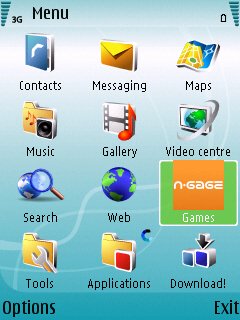
Notice the standby screen now has the search function addeed in! besides that its same old same old. The menu seem to be pretty much the same except the obvious add-ons including N-Gage and Music Player. Both of which has been optimised to be like the N95 8GB edition (N95-2). image

Now this next part will get your fingers tingling, but, does this look like Youtube playing flawlessly on the N95 to go full screen? We'd like to think so!

image

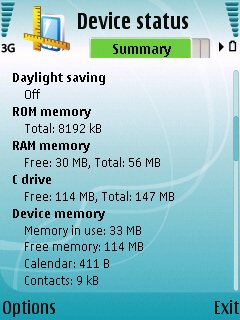
And now for the grand finale, the cherry on the cake! The... The new device paging support with better RAM handling!

image

Is that drool on your shirt?

We reccomend you set up an alter for your N95. It deserves one.

Tuesday, November 20, 2007

First accelerometer game for the N95

Accelerinvaders!  A Space Invaders clone (2D) for the N95, that uses its accelerometer.  The gameplay is pretty much the same as the original, but its a heck lot of fun playing it on the N95, Wii style.

Controls:
shoot: big d-pad button
move ship: move phone

Here's the download link: Accelerinvaders File

Navball - New multiplayer GPS game!

We've stumbled upon this rather peculiar game lately, called Navball.

NavBall is an exciting new multiplayer game that uses GPS phones like the N95 to create an action-packed 45-minute match across the city.

- 2 Teams of 11 players compete for 45 mins
- For each team, a Ball and Goal are placed on a city map
- The location of the ball is discovered by GPS
- By lining up, a team kicks the ball towards the goal (& scores)
- Highest NavBall score wins!

During the demo this was only available to the city of Amsterdam, but if all goes as planned it should be available in many other cities.


Saturday, November 17, 2007

N95 8GB slower, NOT faster


Some bad news for folks that are headed to get the N95 8GB (N95-2). In one of the forums we're in there's been complaints about the N95 8GB being slower than the original. Here's what we could make out:

1. The new N95 8GB actually boots up (remarkably) slower than the old N95.
2. Pixel density is slower than on the original N95 because the screen got bigger from 2.6 to 2.8 yet it has the same 3D accelerator.
3. Quake (it's a game) tests and other 3D Demos seem to run much more smoother in the old N95 than in the new 8GB version.

Accidental mistake? I think not.