Introduction
The Nokia N82 seems somewhat odd, –it wedges into the Nokia’s otherwise consistent range and then provokes a natural question – Is there any real need in this phone? But the answer is right on the surface, you just need to take a better look around to figure out that the N82 is in fact strikes back at Sony Ericsson’s flagship – the Sony Ericsson K850i. This is what Nokia was set to do – roll out a direct rival for the K850i with comparable price tag and an edge in the form of S60. Speaking in favor of this guess is the fact that only now does a Nokia-branded device employs the bundled motion sensor for auto menu rotation not only in the camera application. The N82’s Xenon flash is another tribute to its imaging department. So, these two phones share a whole lot of features, plus the Nokia has hastened to release the N82 into the wild, which is not exactly typical of this company – all these facts seem to add up. The Finnish manufacturer had to launch its solution before the Christmas season and trip up the Sony Ericsson K850i. Hard to say for sure, but as I see it, the company has coped with both goals.

The calls the audience this handset is aimed at “Technology/Style Leaders”, which is a target group characteristic of the NSeries in general – the Nokia N73, which was rivaling the Sony Ericsson K800i a while ago, also came in to appeal to this segment. Obviously, the company is trying to capitalize on the N73’s success by positioning its latest and greatest N82 as a decent replacement for the former – and, well, this is pretty much how the things stand.
On the other hand, this phone focuses on the imaging department – its N-Gage functionality, as well as default applications for the latest generation of S60-powered handsets, only indicate that this is another “do-it-all” offering with knack for photography.
This model is designed for those who still haven’t got a Nokia N95 in their pockets for some reason, yet need a pretty good phone with a potent camera onboard. Also, all candy-bar style buffs will feel content with the N82, since it is the handset’s very conventional design that seems to be quaint for this end of the NSeries.
Its rushed release also indicates that the model will be all the range pretty soon – its price curve will match that of the Sony Ericsson K850i, ensuring some serious rivalry between the two.
The group of consumers looking for a decent cameraphone won’t find the choice between the Nokia N82 and the Nokia N95 8Gb particularly easy, even those the junior model trumps its 8Gb sibling only with the form-factor, lens cover and xenon flash –its image quality is pretty much in line with the N95 8Gb, and all hardware specs haven’t undergone any revamp.


Design
The N82 is housed in a candy-bar type design with average dimensions for its class – 112x50.2x17.3 mm, 114 grams. However when we met it in person, it seemed somewhat on the chubby side, the same impression was delivered by Sony Ericsson K850i, by the way. On the other hand, the phone is very pocket-friendly. But it is not “friendly” enough to be carried on a neck strap, probably some will use an arm strap at best.


The microUSB socket is getting be a par-for-the-course element of every Nokia’s phone – the N82 is no exception, look for it on the left-hand spine. It is used for wired data transfers, while headphones can be plugged in the 3,5 mm audio jack sitting on the top edge alongside the power button. The left side also features the 2 mm charger slot.
Among the queer things about the N82 is the way its stereo-speakers are laid out – they are housed on one flank (on the right). This is the first time when the maker adopts this layout – while you gain with it when watching videos, ring tones are a tad muffled, as they aren’t as loud as with Nokia N81 or the Nokia N95.
The build quality was never an issue with the N82, however we still felt that we would need to see how its surface would fare in the long term. But generally our phone seemed to be sturdy and solid.
As of today, the N82 comes only in one color - Warm Titan/Silver Titan, where the front fascia is silver and resembles metal, plus it picks up finger prints with ease. The rear enjoys a patterned surface made of milky plastic.
Display
The handset comes equipped with a 2,4-inch QVGA (240x320 pixels) display, capable of showing up to 16M colors, presenting you with a quite bright picture that remains visible in various environments.
Facing off the N82’s display against the Nokia N95, you won’t see any real supremacy of the latter in your daily routine, but when it comes to the Nokia N95 8G and its 2,8-inch behemoth of a display, the 0,4-inch difference won’t pass unnoticed. Generally, the N82’s display fares well. The display accommodates up to 8 text and up to 3 service lines. In some modes, though, you may get up to 14 text lines. All fonts are sharp and easy to read.
No protective glass screen is mounted on the N82’s display.
Keypad
One of the most popular questions asked about the N82 is whether its keypad is any good. Indeed, its buttons are smallish, and the shapes aren’t exactly conventional. In fact, this element somewhat reminded me of the Sony Ericsson’s solution, and I don’t think this is a pure coincidence – they wouldn’t have had any troubles squeezing normal numeric buttons on this area, but for some reason, Nokia had dumped its standard keypad style.

Battery
The handset utilizes a 1050 mAh Li-Pol battery (BP-6MT). The N82 is rated for 5 hours of talk time and 225 hours of standby. Music time – up to 10 hours, max quality video recording – up to 110 minutes, video playback – up to 200 minutes. Looking at the battery performance of the Nokia N95 8Gb, the N82 is likely to stay online a day or two, very unlikely it will fare better than that.

Memory
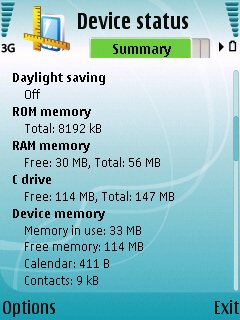
The device comes equipped with 128 Mb of RAM, after first launch you will get around 90 Mb of free memory at your disposal, which is enough for running a dozen of applications and browsing “heavy” web-pages – the word “slow-down” is definitely not in the N82’s vocabulary.
The user has almost 100 Mb of storage available, where can store any data.
The N82 deals with microSD memory cards (hot-swappable), the phone comes packaged with a 2Gb unit. There are no restrictions as far as memory card’s size is concerned – our handset easily identified a 4Gb card.

Connectivity
USB. The handset comes in with USB 2.0 support (data transfer speeds – 600-650 Kb/s, whereas the Nokia N95 offered up to 900-950 Kb/s), upon a successful PC connection you can choose one of the following modes:
- Data Transfer (Mass Storage USB) – memory cards is available, no drivers required, as your OS identifies the handset automatically.
- PC Suite – used for device management via Nokia PC Suite, enables all features of the phone, data backup etc.
- Image Print – no explanation required.
- Media Player (MTP protocol) – synchronizes data with Windows Media Player.
Bluetooth. The smartphone sports EDR-enabled Bluetooth 2.0 alongside the following profiles:
- A2DP
- AVCRP
- BIP-ImagePush
- DUN-GW
- FT-Server
- HandsFree-AG (1.0)
- Headset-AG
- OBEX
- OPP-Client
- OPP-Server
- SIM Access-Server
The top speed you can get with the N82’s Bluetooth connection is around 100 Kb/s. We also tested its A2DP profile in pair with the Sony Ericsson DS970 headset, which worked just fine – we managed our play list, skipped within tracks and adjusted volume seamlessly, however we couldn’t make current track’s title show up on the N82’s display.
Wi-Fi. This handset comes armed with Wi-Fi (IEEE 802.11 g) support. All security standards are supported: WEP , WPA , WPA 2, with other advanced settings available. The device supports Universal PnP standard (UPnP), which is the successor to the wired standard PnP. With its help, along with Wi-Fi, you can send slides to a TV, music to a stereo system, and photos to a printer. In a certain sense UPnP is like an add-on to the infrastructure (Wi-Fi, for example) in the form of Bluetooth-esque services, so this looks more like a software upgrade. The sales package includes Home Media Server, which allows connecting the N82 through your home Wi-Fi network to a desktop PC.
There is also a Wi-Fi wizard available in the N82 – it can keep looking for enabled networks in the background mode and tap into them.
Camera
The N82’s camera module has been carried over from the Nokia N95, and its major trump is the xenon flash. The edge it has over the standard LED unit can be seen already today – in fact, it all comes down to a couple of scenes, snaps taken in the dark and indoors. Sony Ericsson was the first maker to adopt this type of flash, and the K850i, in addition to its xenon unit, boasts a LED flash gun, which is the best way to go for a mobile device, ensuring high-quality of images you get even while in photography-unfriendly environments.

If you don’t tend to take your snaps in the dark or use the flash gun extensively, you won’t spot any substantial difference between the Nokia N95, the Nokia N95 8Gb, and the Nokia N82. The latter may use revamped image procession algorithms, but you won’t know this from the camera’s shots. We will be putting the N82’s camera through its paces in a comprehensive review – basically, this is not we are going to do during our first hands-on sessions with the handset.
The camera lens is protected by the cover, opening which launches the camera application. The company’s managers put special emphasis on their efforts to reduce the time between sliding the cover open and taking a snap. The N82 does all this in a couple of seconds, which is a pretty good result comparable with the market’s finest offerings. Probably, this speed is mainly due to the increased RAM volume.
Final words
Has Nokia hit the bull’s eye with this model? It is absolutely safe to say this handset will appeal to the masses and will be a truly sought-after offering – the N82 definitely has what it takes and just like the Nokia N73 a year ago, it is on its way to the title of the most affordable and decent Nokia-branded imaging-minded solution. Its music department is no different from the Nokia N95, meaning that it proves to be somewhat inferior to the Nokia N81. Still, your music experience with the N82 won’t be irritating or dismal. Missing remote control from the sales package is another hint at the handset’s true positioning. Given its current retail price of 450 Euro, the N82 is up against the Sony Ericsson K850i alone. Which one to go for, I hear you ask? It will be one tough decision for you, better listen to what your experience of playing around with either of the phones tells you. For the owners of the Nokia N95, the N82 won’t break any new ground, so you can rest well at night knowing you still have the best in your hands. :)
-Mostly apapted from mobile-review-